Email That Works for You
A desktop email client in the spirit of Classic Eudora — search that answers from your own disk, filters with eighteen actions, labels, stationery, personalities, and your mail stored on your machine in mbox format. Mail arrives the moment it is sent, and a mailbox of a hundred thousand messages stays quick. No account of ours, no telemetry, no subscription. Free and open source.
Your Mail, Back on Your Desk
A native desktop email client — Rust core, no Electron — that connects to the accounts you already have and keeps everything it downloads in formats you can read without us.
Two Layouts, One Program
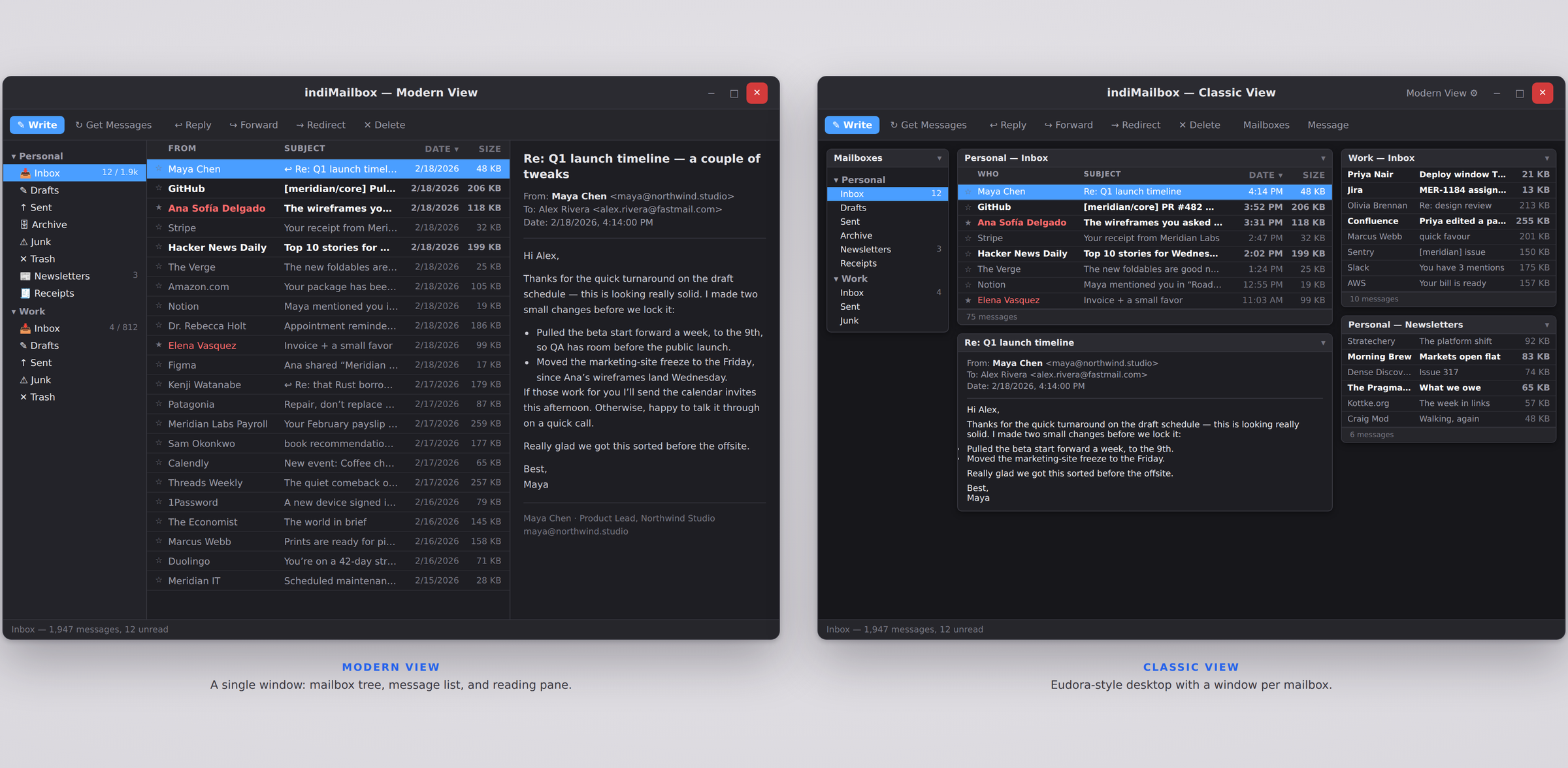
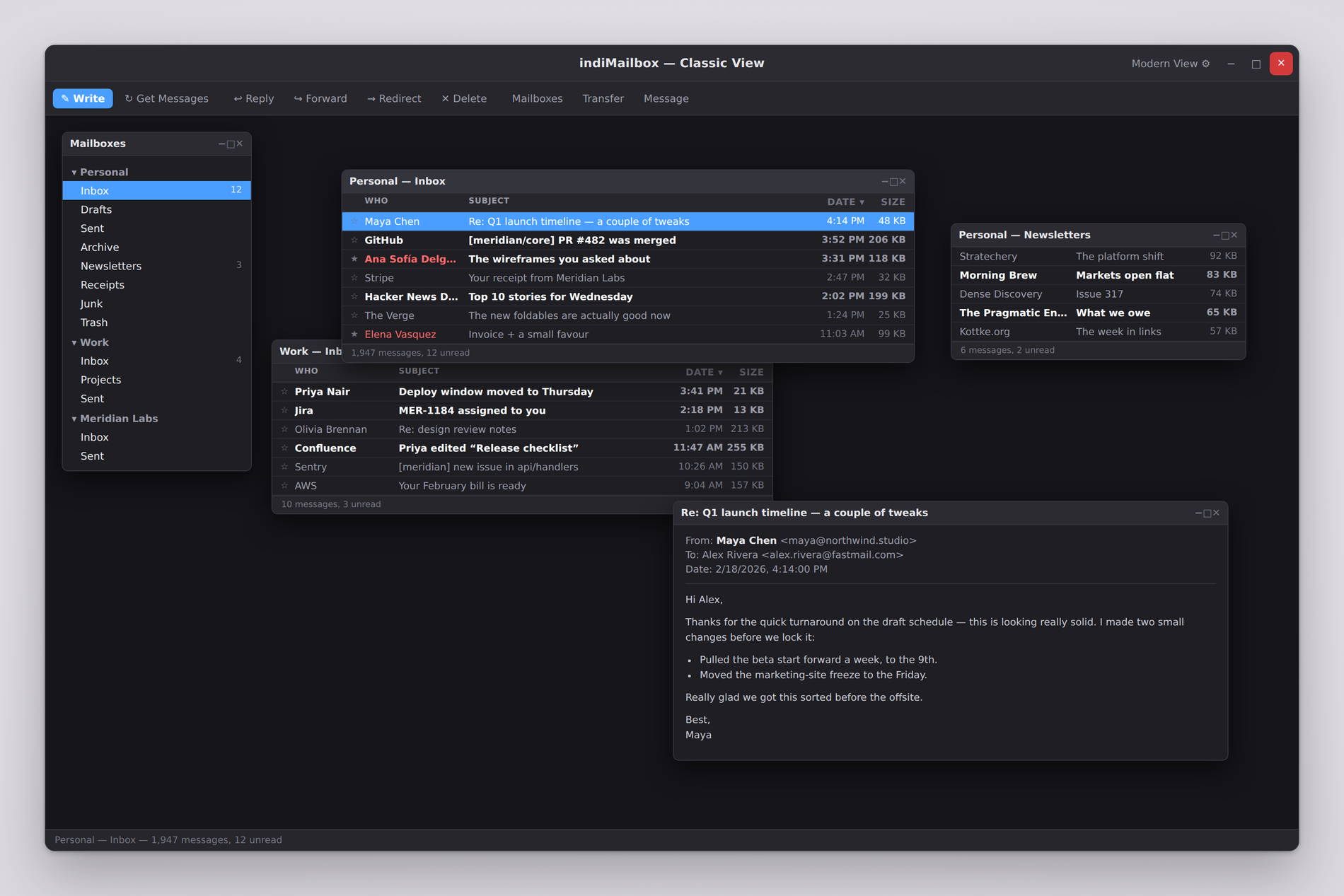
A modern three-pane view, or Classic Mode — Eudora's multi-window desktop, where the mailbox list, each open mailbox, and the message you're reading are separate windows that remember where you put them. Switch any time; nothing is lost either way.
- Classic Mode: draggable mailbox and message windows
- Modern Mode: sidebar, message list, and preview panes
- Panes, columns, and windows all remember their positions
- Light, dark, or system theme — with your desktop's accent colour
Mail That Arrives, on a Mailbox That Stays Fast
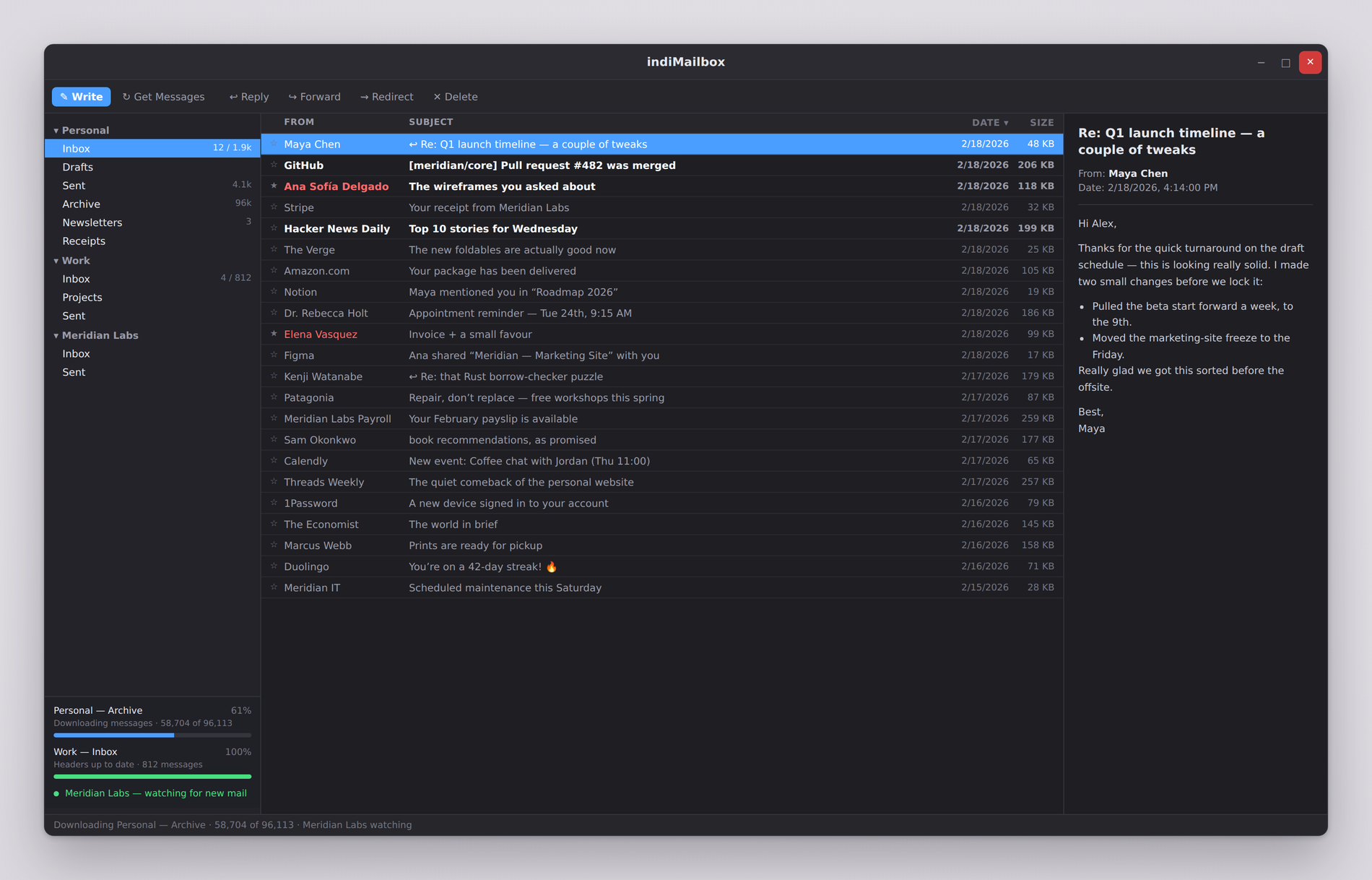
indiMailbox holds a connection open so your server can announce new mail as it is delivered — usually within a second, rather than whenever a timer next comes round. Behind that, whole messages come down on their own connection, so a download of a hundred thousand can run for hours without the program ever feeling busy.
- Push mail over IDLE, with a fallback to checking on a timer
- Message bodies download in the background, resuming where they left off
- Built for six-figure mailboxes: steady memory, no stalls, no spinner
- Several accounts checking, watching and downloading at once
Find It in Your Own Mail, Instantly
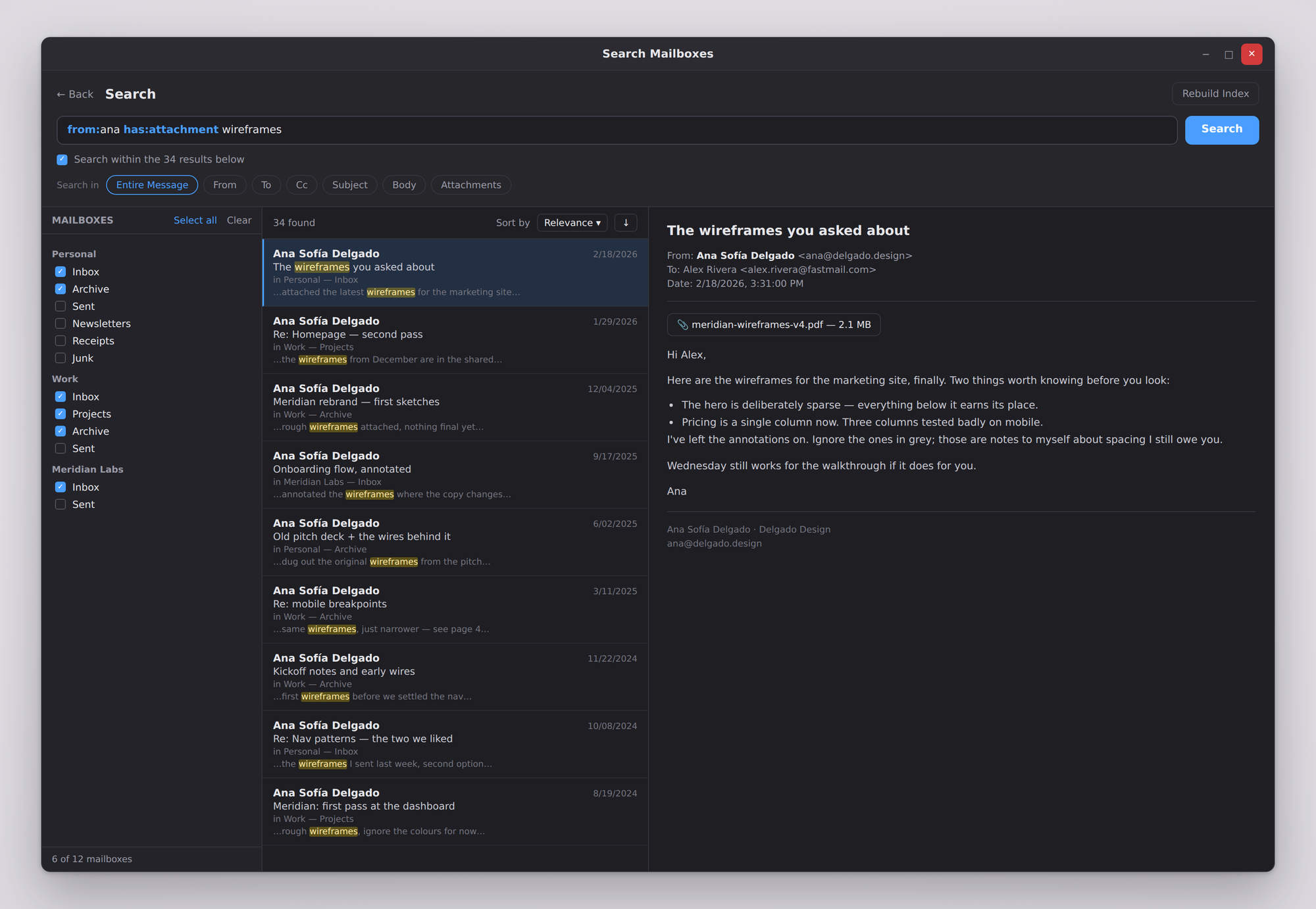
Every message you have ever downloaded, indexed on your machine. No round trip to a server, no provider deciding how far back you may look, and nothing about what you searched for leaving the computer. Years of mail answer in the time it takes to stop typing.
-
from:,to:,subject:,has:attachment,is:signed,date:2026-01-01..2026-06-30 - Choose the mailboxes to search — one, several, or everything — and the days, from a calendar
- Search within your results to narrow, the way Eudora did, as often as you like
- Read, reply, file, label or delete a result without leaving the search
Guards That Watch Your Back
The ideas that made Eudora feel like it was on your side, rebuilt for modern mail. Everything learns and decides locally — nothing about your reading habits leaves the machine.
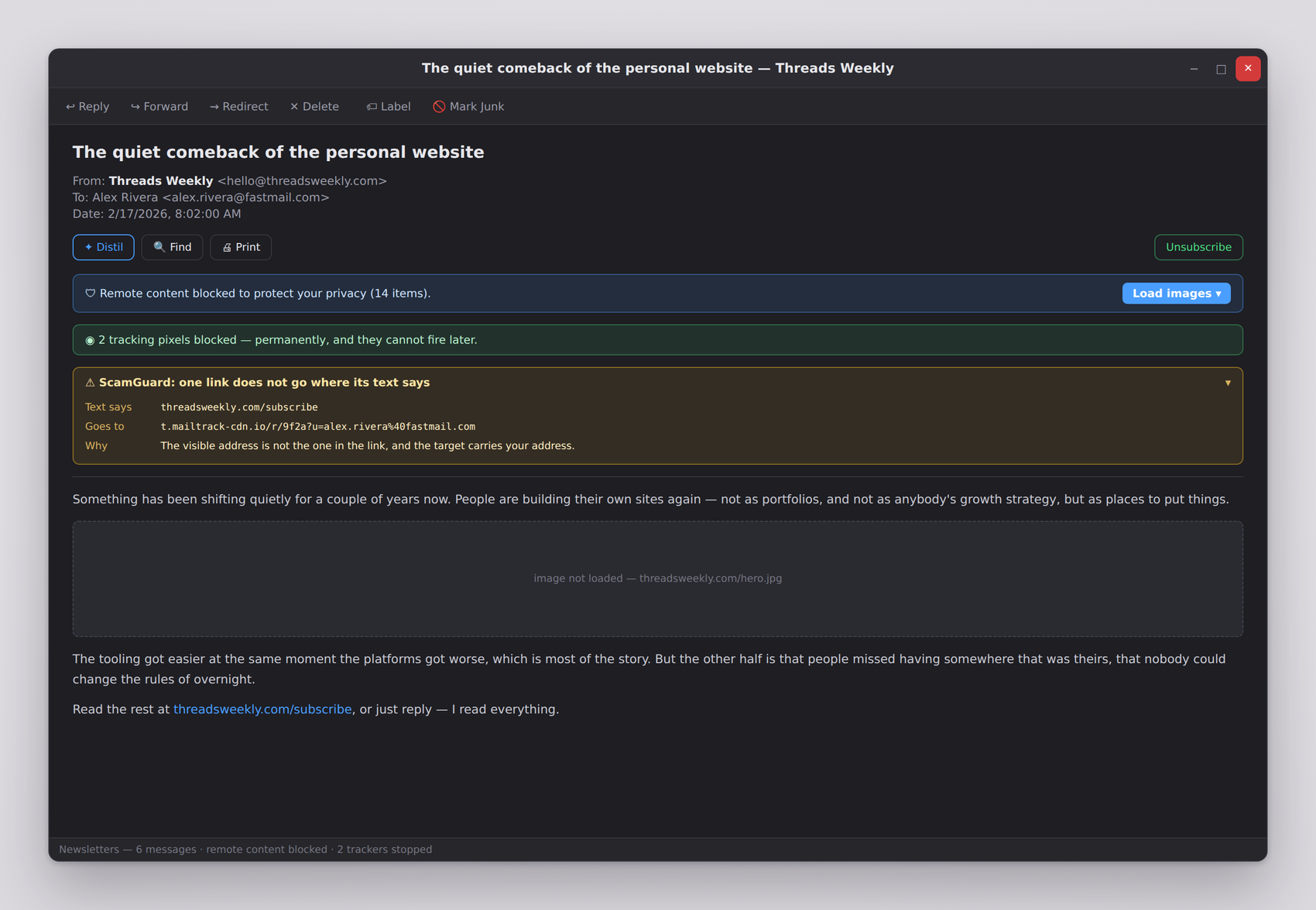
- ScamGuard flags links whose text disagrees with where they go
- ToneGuard asks before you send something you'd regret
- SpamGuard learns junk from what you mark, not someone else's list
- Content Distiller strips quoted history to show what's actually new
- One-click unsubscribe from newsletters — never offered on junk mail
Write Now, Send When You Mean To
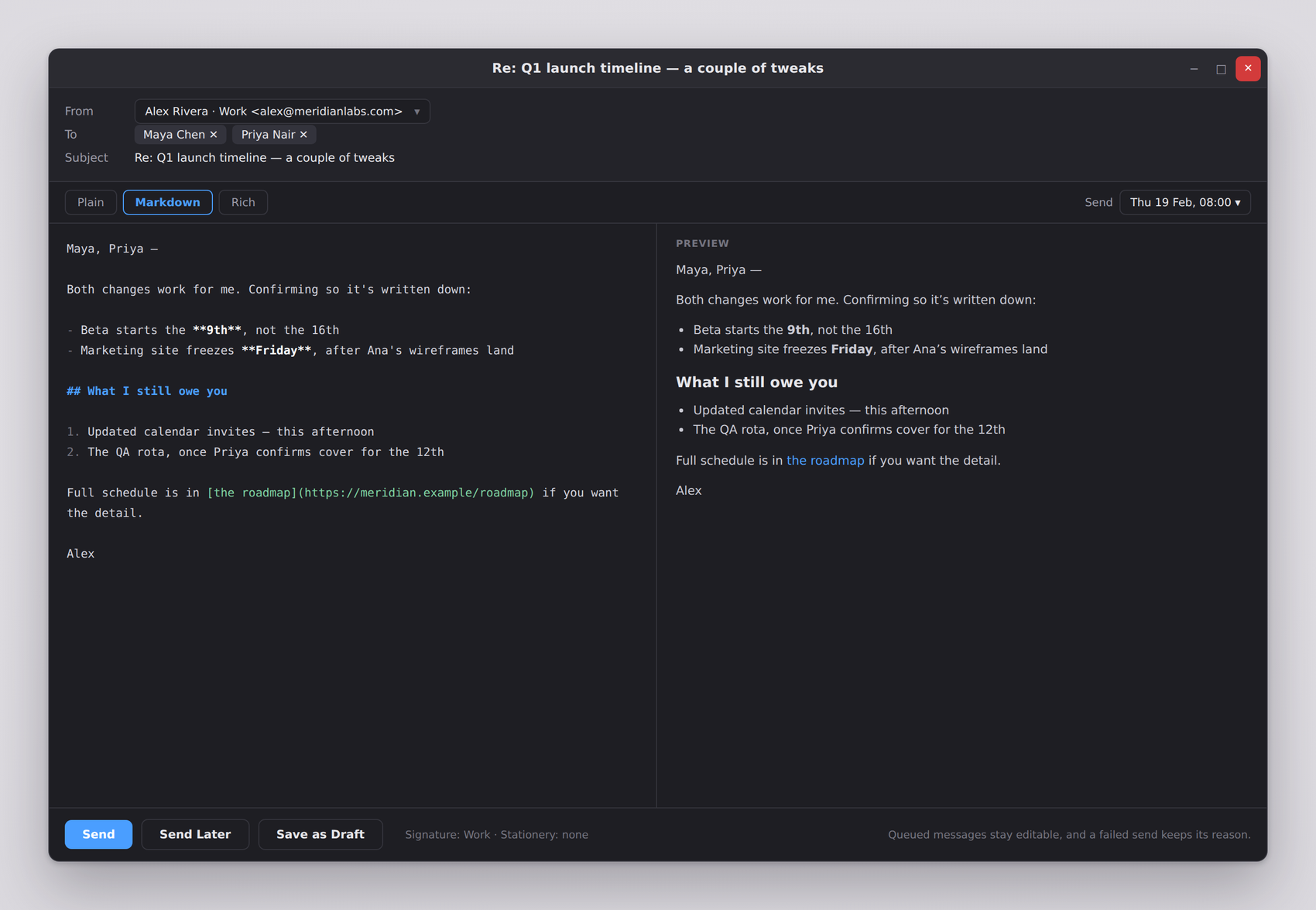
Compose in plain text, Markdown with a preview that is exactly what will be sent, or rich HTML. Queue mail in a real Outbox, schedule it for a specific time, or redirect a message onward as if from its original sender — Eudora's own trick, done properly.
- Send Later and send-at-a-time, with editable queued messages
- Stationery templates, signatures, and per-address personalities
- Redirect: replies go to the original sender, not to you
- A failed send stays queued with the reason — nothing is ever lost
A Complete Email Client
Free and open source under the GNU GPL v3. Every feature, no upsells, no premium tier.
IMAP & POP3
UID-based IMAP sync that handles six-figure mailboxes, and POP3 with leave-on-server options.
Microsoft Exchange
Pick Exchange, give your address and password, and the server is asked for its own settings — hosts, ports, and the DOMAIN\username login nobody can guess. On-premises Exchange over IMAP and SMTP; Microsoft 365 signs in with OAuth2.
Credentials in the Keychain
Passwords and app passwords live in your system keychain, never in a config file. OAuth2 is built in and works once you supply your own provider credentials.
Filters That Do Real Work
Eighteen actions, not four — file, label, flag, notify, forward, auto-reply, or stop the chain. Match any header your mail carries, on the way in or the way out.
OpenPGP Built In
PGP/MIME signing and encryption that interoperates with Thunderbird and Evolution, with key management included.
Personalities
Several From addresses on one account, each with its own signature and stationery.
Stationery
Message templates with New Message With and Reply With menus, appliable by filters too.
Fifteen Labels
Named and coloured; a labelled message is shown in its label's colour throughout the mailbox.
Address Book
Contacts, groups, nicknames and custom fields — plus your desktop's own address book on Linux.
Import Anything
Unix mbox, Eudora .mbx, and Outlook .pst/.ost archives, uploaded to the account you choose.
Remote Content Blocked
Opening a message doesn't tell the sender you read it. Load once, or trust a sender permanently.
One-Click Unsubscribe
Leaves a mailing list via the sender's own unsubscribe header — one click, no third-party service in the path.
Junk That Learns
A Bayesian filter trained by your own mark-as-junk, locally, and resettable at any time.
Queue & Schedule
A real Outbox with Eudora's Q markers, timed sending, and editable queued messages.
Mail Statistics
Totals, per-day charts, top correspondents and disk use — computed locally, reported to no one.
Link History
Every link you've opened from a message, with the message it came from. Kept for you, not about you.
mbox Storage
Mail in mbox, settings in plain TOML, one folder per account. No export step required to leave.
Save & Print
Save any message as text or raw .eml, save attachments where you choose, print what you need.
Push Mail
A held-open connection per account means new mail appears as it is delivered, not when a timer says so.
Attachment Strip
What a message carries, in one line: open it, save it where you choose, or save them all.
Inline Images
Newsletters render as their senders built them, without listing the pictures as files you never received.
Spell Check
As you type, in your own locale, using the dictionaries your desktop already has.
Your Default Mail App
Registers as a mail client, so a mailto link anywhere on your desktop opens a message here.
Keyboard Driven
Walk a mailbox with the arrow keys, select and act on many messages at once, and reach everything from the menubar.
Sized to Suit You
Independent text sizes for the mailbox list and the message list, and accounts that fold away when you're not watching them.
Compact Mailboxes
Eudora's housekeeping, kept: expunge on the server, clear out records of mailboxes that are gone, recheck every downloaded message for attachments, and give the disk space back.
Local-First, No Strings
No indiMailbox account, no telemetry, no server of ours in the path. Search runs locally, the junk filter learns locally, and your mail lives in mbox files any mail program can read.
Free & Open Source
Released under the GNU General Public License v3. Read the code, build it yourself, or contribute — and any fork stays free too, because the GPL requires it. No premium tier, no paywalled features; every capability is included for everyone.
Private by Construction
Remote content blocked by default, HTML sanitised before display, OpenPGP end-to-end encryption, and credentials kept in your system keychain — never in a config file. Links open only if they point at a web page; attachments the system would run rather than open are refused.
Get indiMailbox Free
Native desktop application for Linux and Windows. Choose your preferred format, or install from our package repository for automatic updates.
Linux packages and a Windows installer. A macOS build is planned but not ready — we would rather ship it late than ship it broken.
Prefer automatic updates? Install from our repository:
Need help getting started? Read the documentation or browse the source on GitHub.
indiMailbox Is Free, and Stays Free
There is no premium tier, no feature held back, no advertising, and nothing about you being sold — not your attention and not your mail. indiMailbox is free, and always will be; a donation is simply what helps keep it that way.
Any amount, once or repeatedly — there is no subscription and nothing is unlocked by it. If money isn't what you have to give, a clear bug report, a fix, or a translation is worth as much.
Your Mail. Your Machine. Your Rules.
Email the way it used to work — and the way it still should.